Chen Ruihan's Project Portfolio Page
Project: SectresBook
SectresBook helps secretaries to maintain all the information of the members of their club by collating a list of identifiable information, past records and future tasks.
Given below are my contributions to the project.
Code contributed: RepoSense link
New Features Implemented
- Loan Property of a Person (#50)
- What it does: Implements the ability to track monetary amounts that are represented as loaned amounts. The loan amounts must be between -1 trillion to 1 trillion inclusive.
- Justification: A treasurer requires the need to keep track of monetary transactions. A loan is a data type created to serve this purpose.
- User Interface Design (#75)
- What it does: Remodel and redesigned the user interface as shown in the landing page. Various small icons, images, alignment details and transitions are also applied for visual enhancement.
- Justification: The previous UI design did not look appealing, so a more visually appealing design was created. This will help the product’s publicity and attractiveness to clients.
- Highlights: Event based triggers (space to start typing, esc to exit typing), transition effects and embellishments.
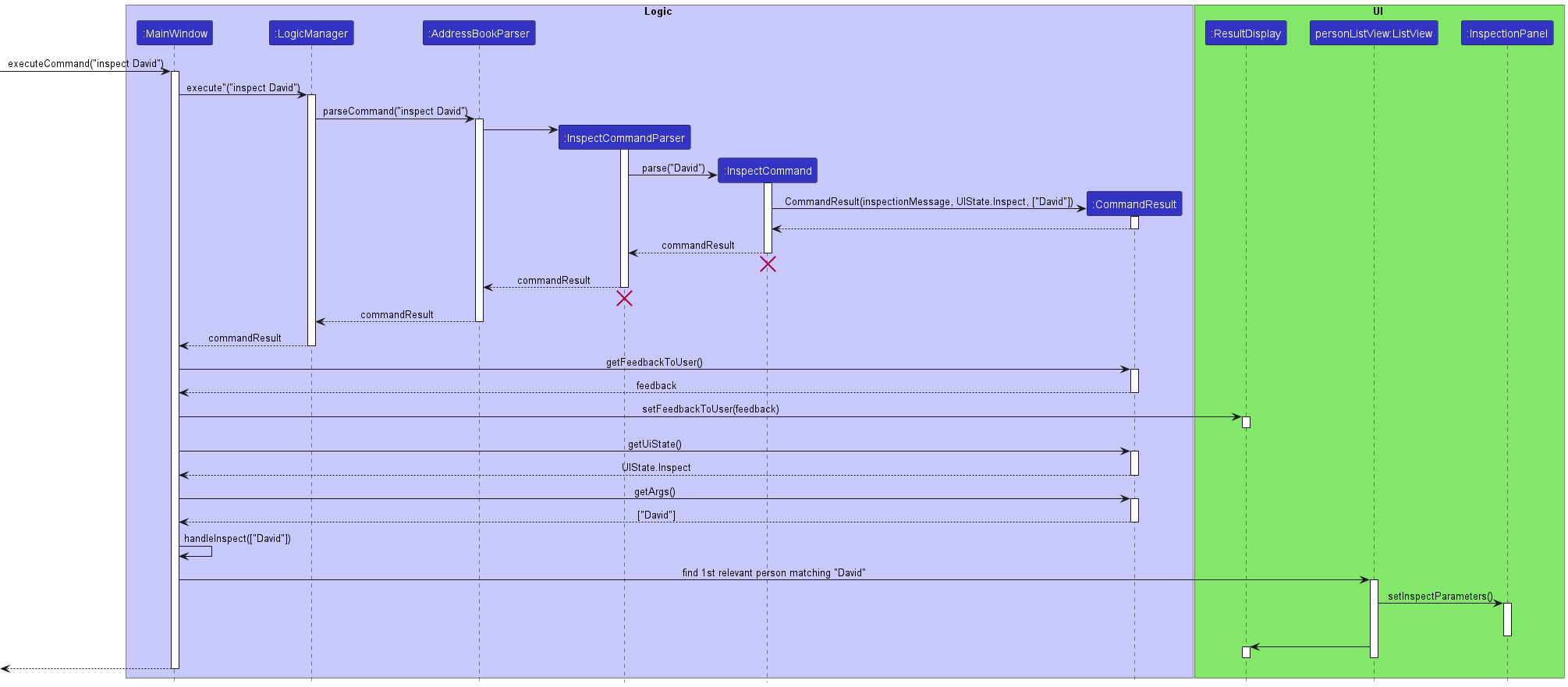
- Inspect command (#75)
- What it does: Inspects a person in the person’s list. Inspection is a UI-centric command that updates UI values. It does not mutate any data in the model. This is also equivalent to just click on the person card.
- Justification: The UI requires more flexibility when coupled with the CLI, there shouldn’t be things that the GUI can do that the CLI cannot, so the
inspectcommand was created.
- Show and Hide Notes Panel Command (#75)
- What it does: Shows/hides the notes panel by applying a translational transition with a fade transition to the StackPane containing the notes panel with anchor points on an AnchorPane.
- Justification: It is difficult to view more than 6 people in the list at the same time especially if working on a monitor with a smaller resolution. By hiding the notes panel, more screen real estate can be given to the person list and inspect panel.
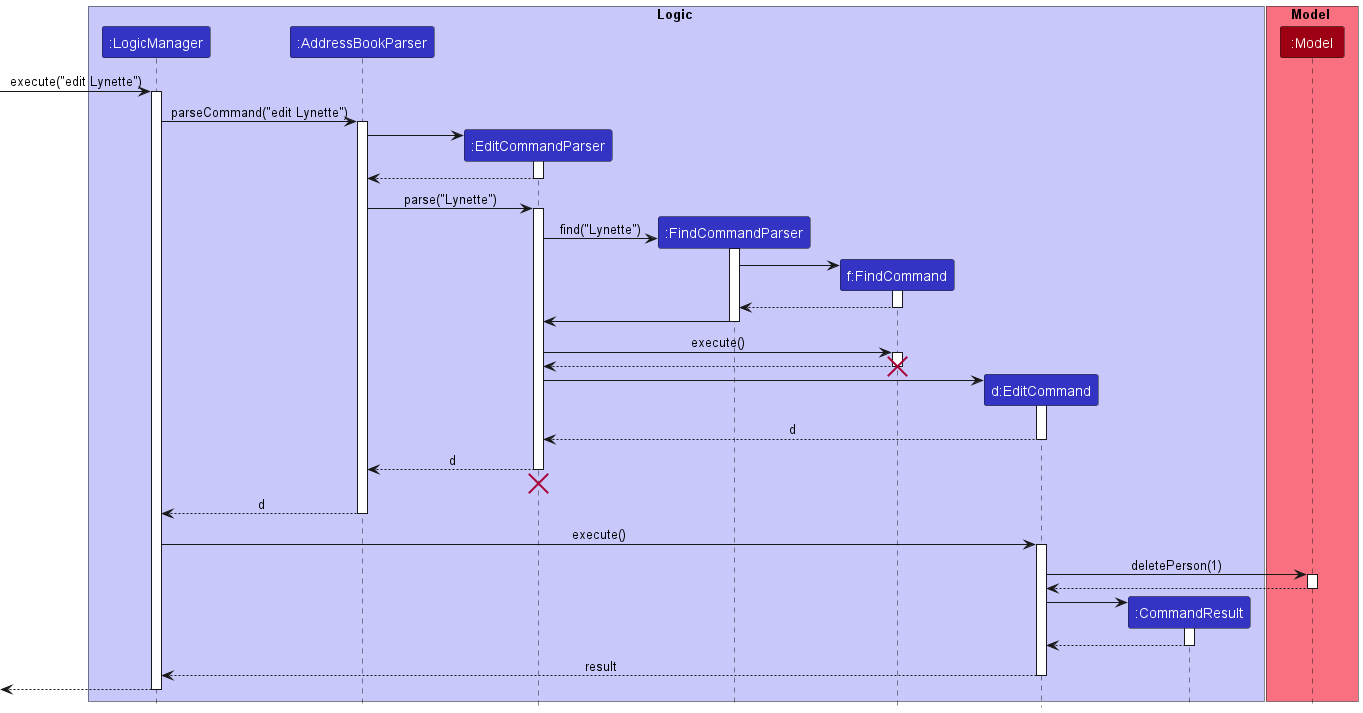
- Edit By Name (#52)
- What it does: Adding onto the ability to edit by index, I implemented an ability to edit by any keyword of the person’s name. This makes it more convenient to specify edit operations without checking for name
- Justification: It is easier to recall a person’s name than to read the index from the list.
Project management:
- Called meetings to discuss plans.
- Created milestones and description of milestones and provided feedback on Github PRs and organised issues with tags.
Contributions to team-based tasks:
- Setting up the GitHub team org/repo
- Changed the product icon to the current version (ledger with pen) using GIMP (#102)
- Released version v1.3.1 for PE-D and fixed 16 bugs after PE-D (#179)
Review/mentoring contributions:
- Reviewed contributions by other group members, sometimes suggesting other alternatives for better maintainability.
- Gave comments on suggestions for bug fixes in the issues tab and published issues based on more bugs found in the issues sections.
Contributions beyond the project team:
- Frequently posted in the forums to help other on iP related issues, such as setting the background, smoke testing and basic feature development.
- During the PE-D, authored issues based on the structure of
Description,Steps to reproduceandSuggestion, making the issues clear and reproducible
Contributions to the UG/DG:
- UG
- Added images and icons
- Added the User Interface section of the UG with pointers to which part corresponds to what function and usage. Link to UI section
- Added description of properties for both people and notes, found here and description of commands
inspect,hideNotesandshowNotes. - Added Glossary terms.
- DG
- Added Edit Sequence Diagram involving either searching by index or by name and Inspect Sequence Diagram for the
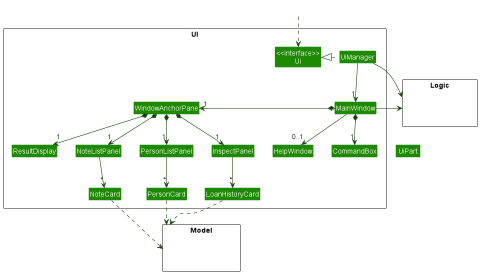
inspectcommand (#84) - Updated the UI Class Diagram to reflect the current state of the UI organisation and the Person Class Diagram by adding the loans property to the Person Class Diagram
- Wrote the sections involving UI design and the implementation details of
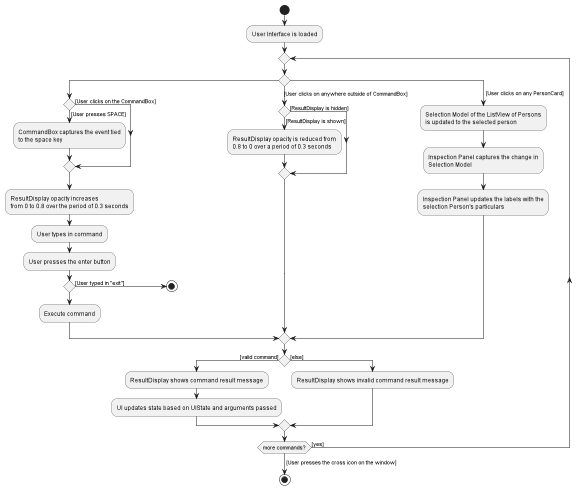
inspect, andshowNotesandhideNotes, found here. (#189) - Added UI Activity Diagram that describes how a user would interact with the UI
- Added Edit Sequence Diagram involving either searching by index or by name and Inspect Sequence Diagram for the
Diagram Extracts for DG
Edit Sequence Diagram
Inspect Sequence Diagram
UI Class Diagram
Person Class Diagram

UI Activity Diagram
Text extracts to UG and DG are linked in the text above.