Pinran's Project Portfolio Page
Project: SectresBook
SectresBook helps secretaries to maintain all the information of the members of their club by collating a list of identifiable information, past records and future tasks.
Given below are my contributions to the project.
-
Code contributed: RepoSense link
-
New Features Implemented
- Notes model (Link to own PR)
- What it does: Add structure of notes in model. Notes contain a unique title and its content. Notes are contained in a
NoteBook. - Justification: A treasurer/secretary may require keeping notes on his/her tasks.
- Highlights: Difficult to implement as Notes interact with many parts of the code which requires full understanding of the code and its structure.(From
AddressBook,Model,ModelManger, to how data is stored inJsonSerializableAddressBook). Required the modification/creation of over 15 classes.
- What it does: Add structure of notes in model. Notes contain a unique title and its content. Notes are contained in a
- Add Note command (Link to own PR)
- What it does: Allows adding of notes into SectresBook by specifying a title and content (optional tag) using respective prefixes.
- Justification: Command is needed to allow the user to add a note into SectresBook to be kept track of.
- Delete Note command (Link to own PR)
- What it does: Allows the deleting of notes in SectresBook by specifying an index in the notes listed.
- Justification: A delete command is needed to allow users to delete notes that are no longer relevant or needed to be kept track of.
- List Note command (Link to own PR)
- What it does: Lists all the notes that is being kept track of.
- Justification: A list command is needed to allow users at any point to view/reset the full list of notes.
- Edit Note command (Link to own PR)
- What it does: Edits the note specified by index/name in the list of notes being kept track of. Notes can be edited by any combinations of
Title,ContentorTag(At least one). - Justification: An edit command is important to allow users to change a certain property of a note (In the event that a mistake was made when adding a note or a note’s property changed) without the need of deleting the note and re-adding it.
- Highlights: Editing of notes was difficult as the properties of a Note cannot be directly accessed and modified, thus, a system needed to be in place in creating a new
Notethat needed to replace theNoteto be edited. This newNotehad to retain properties of the oldNotethat were not modified.
- What it does: Edits the note specified by index/name in the list of notes being kept track of. Notes can be edited by any combinations of
- Find Note command (Link to own PR)
- What it does: Allow the user to find a note in the list of notes kept in SectresBook that matches the keyword specified.
- Justification: Find command for notes is important to allow users to filter through the current list of notes to magnify and search for the note that are of interest to them. This is important especially in the case where many notes are currently being kept track of.
- Highlights: Searching by keywords that matches words in
TitleofNotewas tricky asTitlecontain special characters (ASCII). Thus, many design considerations were needed in deciding what should and should not be allowed to be keyed in as the keywords for the command. Keywords also made to ignore special characters, thus, specialStringmanipulation was needed to allow for a correct search.
- Notes model (Link to own PR)
- Project management:
- Initiated meetings
- Approved a majority of PRs (42 pull requests)
- Facilitated and encouraged discussion during meetings.
- Ensure that project deadlines are met timely.
- Enhancements implemented:
- Wrote test cases for all note features/commands to increase coverage by +2.38%, from 65.96% to 68.34%
- Justification: After adding 5 new commands for
Noteand implementation ofNoteitself, code coverage fell as many new classes were created. - Highlights: Since notes are a completely new implementation, tedious work was required to set up
TypicalNotes, an example of a typical note used for testing with. Extra utility classes were also needed to be created for the new notes.
- Contributions to team-based tasks:
- Necessary implementations of entire Note features.
- Structure of Notes, its integration and all of its related commands.
- Updated parts of UG/DG not specific to a feature.
- Fixed bugs(including UG bugs) related to implementation of notes.
- Necessary implementations of entire Note features.
- Review/mentoring contributions:
- Reviewed contributions/pull requests by other group members
- Reading and checking of pull requests by other members, subsequently approving them
- Approved a majority of PRs (42 pull requests approved total)
- Gave comments and helped correct bugs brought up in PRs
- Wrote the probable source of bug
- Directed to exact location of bug in a comment
- Example of such cases here
- Reviewed contributions/pull requests by other group members
- Contributions beyond the project team:
- During PE-D, bugs were thoroughly sieved and detected. Feedbacks regarding bugs found were organised neatly into
small description of featureandproblem found. Feedbacks were accompanied by screenshots for better clarity and documenting.- Suggestions were also made to strive and improve quality of product.
- Links to section
- During PE-D, bugs were thoroughly sieved and detected. Feedbacks regarding bugs found were organised neatly into
Contributions to the UG:
- Added section on
Introduction to SectresBook(not specific to feature) - Added section on
Using this guide(not specific to feature) - Added sections on
Note Features- Including the following sections (All of which can be found here)
Adding Notes: addNoteEditing Notes: editNoteDeleting Notes: deleteNoteLocating a note by title: findNoteListing Notes: listNote
- Including the following sections (All of which can be found here)
- Added some questions under
FAQ
Contributions to the DG:
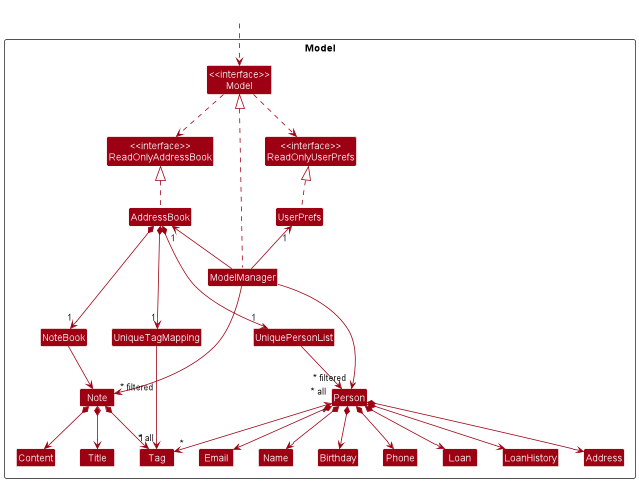
- Helped implemented Model class diagram
- Added entire section on
Notes Features- Added section on
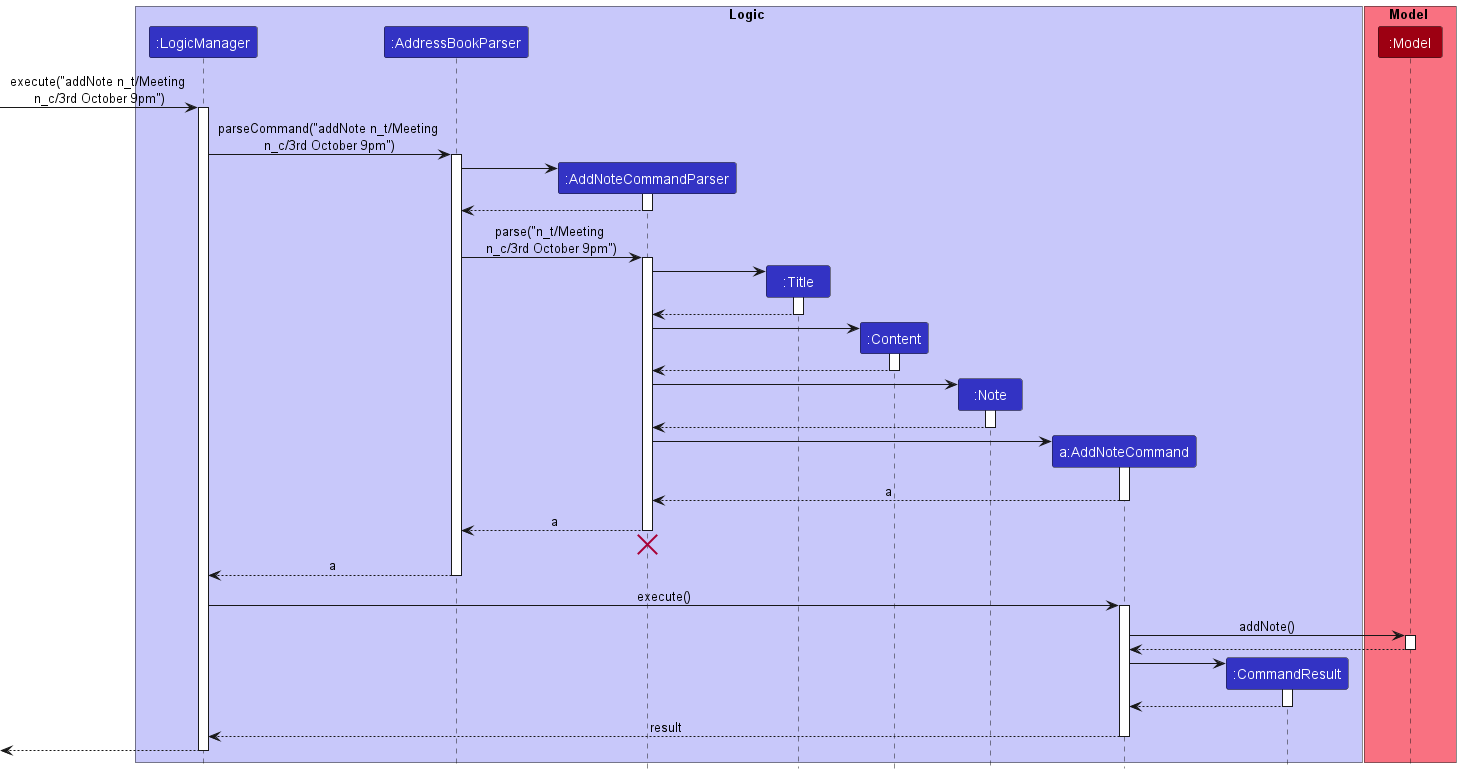
addNote feature- Includes : implementation, example scenario and design considerations
- Includes the following sequence diagram (using PlantUML)
- Added section on
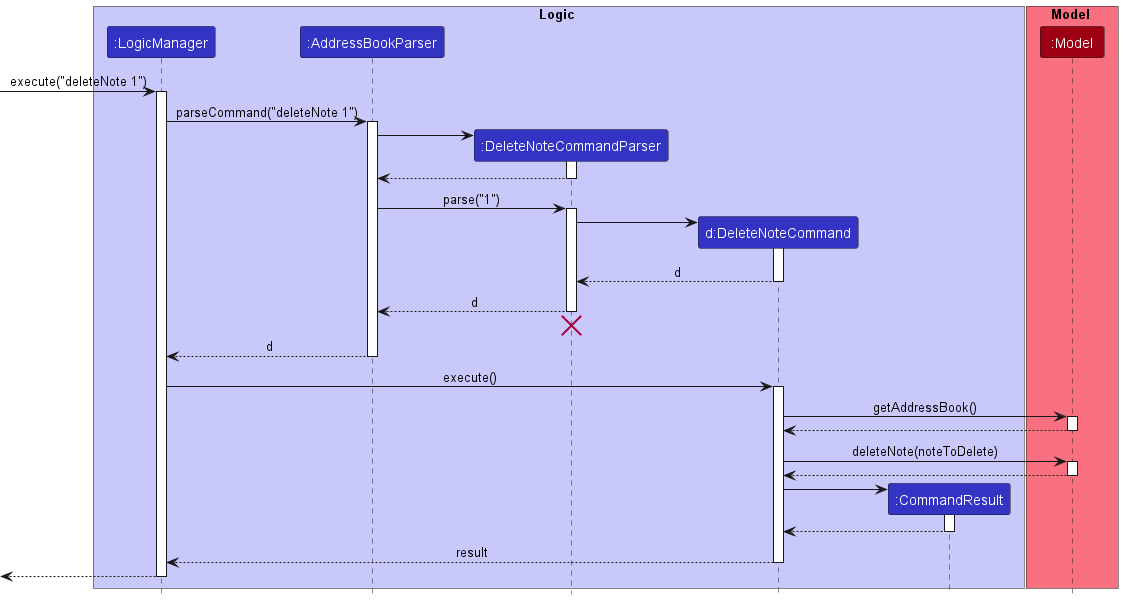
deleteNote feature- Includes : implementation, example scenario and design considerations
- Includes the following sequence diagram (using PlantUML)
- Added section on
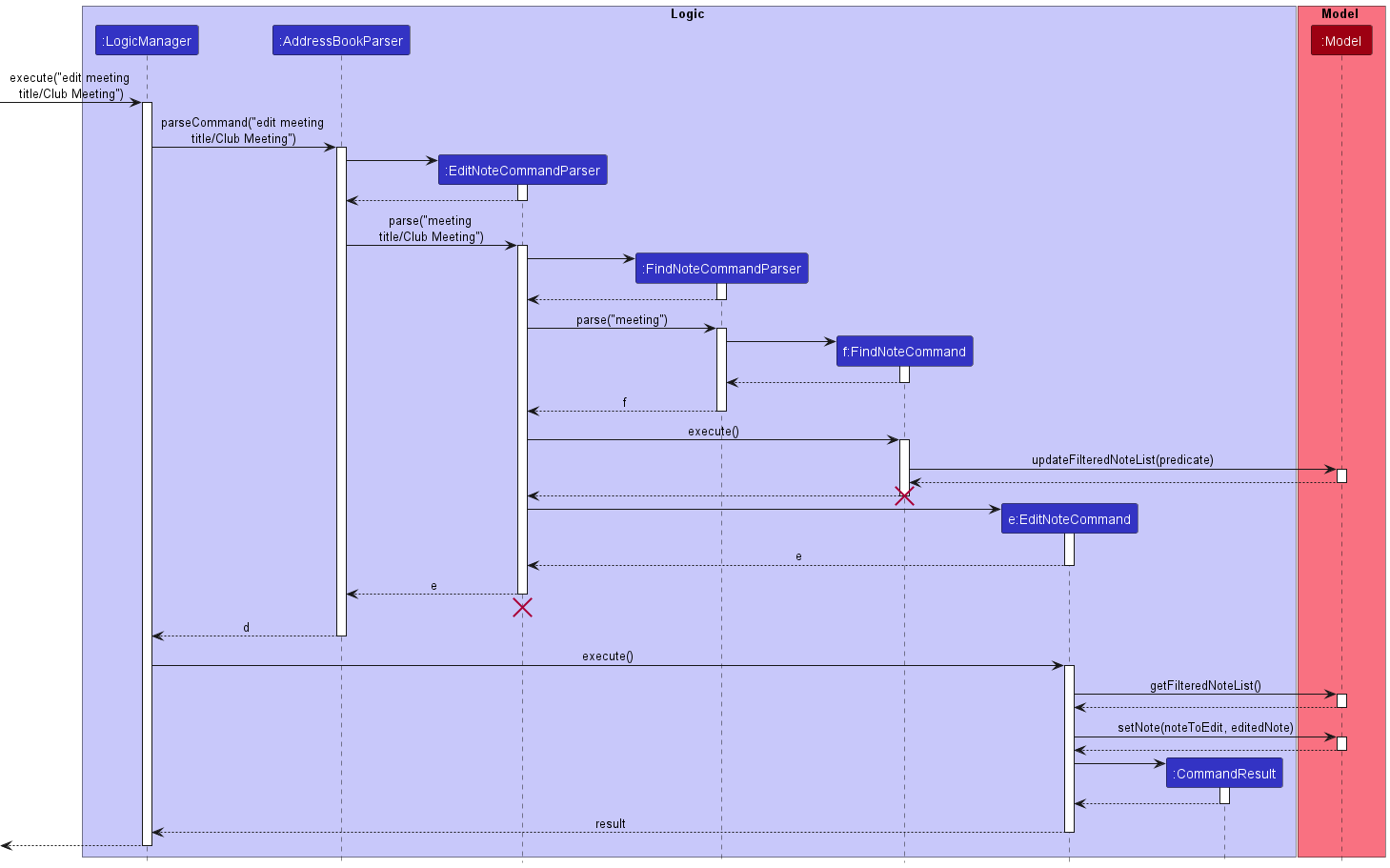
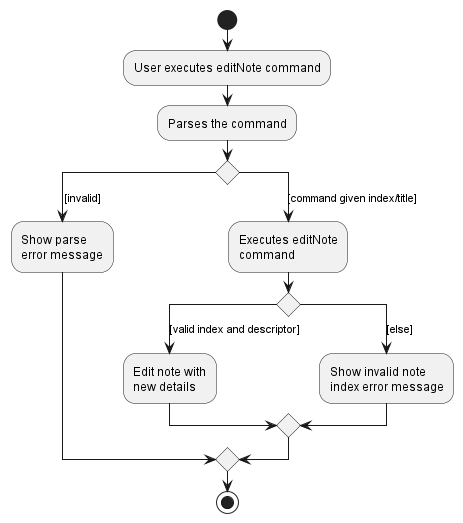
editNote feature- Includes : implementation, example scenario and design considerations
- Includes the following sequence diagram (using PlantUML)
- Includes the following activity diagram (using PlantUML)
- Added section on
- Added User stories
- Added all user stories in the table.
Link to DG can be found here